4. Boundary condition settings
Right-clicking on "Object Browser > Boundary Condition Setting" displays the following options.

Boundary Condition |
RRI manual related section |
|---|---|
Dam |
8.11 Dam option |
Time series for river discharge |
8.8 On Boundary Condition |
Time series for river depth |
8.8 On Boundary Condition |
Time series for slope discharge |
8.8 On Boundary Condition |
Time series for slope depth |
8.8 On Boundary Condition |
Flow diversion setting |
8.10 Diversion option |
5.1 Dam
Dams must be set on river channel cells. River channel cells are those with an upstream contributing area (number of pixels) equal to or greater than the "River Channel Determination Threshold." You can identify them by checking cell attributes such as Width and Depth. Among the river channel cells, select the cell(s) closest to the dam embankment as the dam cell(s).

The following parameters can be configured for each dam:

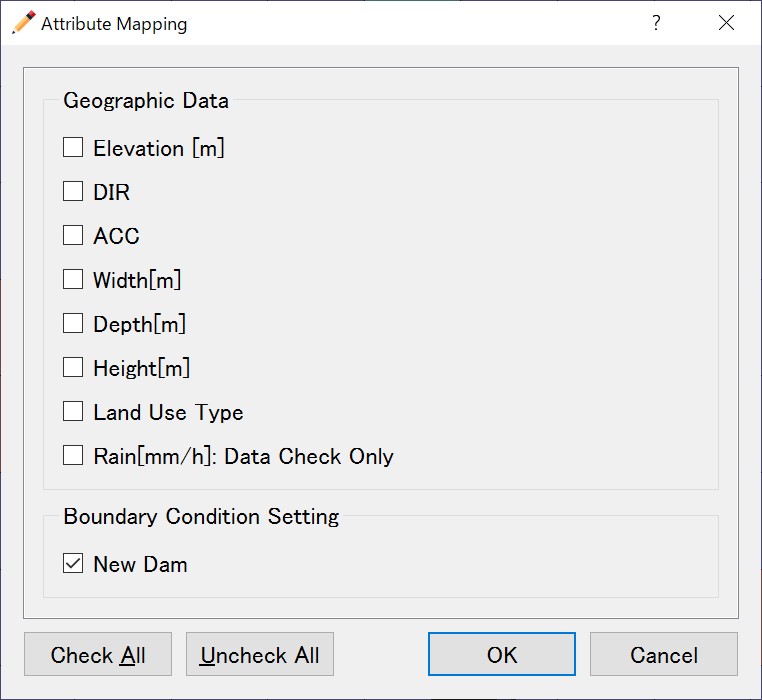
Boundary conditions also need to be mapped as grid attributes. After setting the conditions, click "Grid" > "Attribute Mapping" > "Execute". Check the box next to "Boundary Condition Setting > New Dam" and click the "OK" button.
5.2 River channel cell discharge
When observed discharge data is available, those can be set as a time series data. For details, please refer to section 8.8 "On Boundary Conditions" in the RRI manual.
5.3 River Channel Cell Water Depth
When water depth measurements are available for river channel cells, these observations can be input as a time series. Please see section 8.8, "On Boundary Conditions," in the RRI manual for further details.
5.4 Hillslope Cell Discharge
When discharge observations are available for hillslope cells, you can input this data as a time series. Please see section 8.8, "On Boundary Conditions," of the RRI manual for more information.
5.5 Hillslope Cell Water Depth
When water depth measurements are available for hillslope cells, this observed data can be set as a time series. Refer to section 8.8, "On Boundary Conditions," in the RRI manual for detailed instructions.
5.6 Flow diversion
This boundary condition allows you to forcibly divert flow from a cell.
Select the starting cell where flow is diverted along a path different from the main river channel, such as when a tunnel or culvert (which is difficult to represent in the topographic data) is present. The cell must be a river channel cell. You can specify the i, j coordinates of the outlet cell where the diverted flow goes, and the diversion flow ratio in the settings.
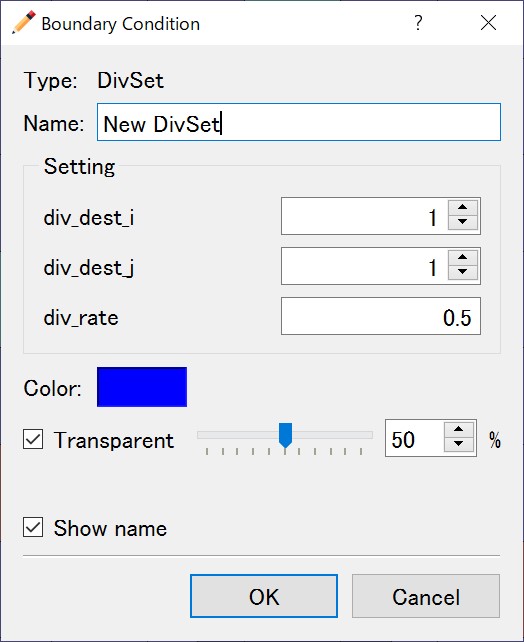
For further details, please refer to section 8.10 "Diversion Option" in the RRI manual.